Building a Personal Website Entirely with Claude Code
Building a Personal Website Entirely with Claude Code
I’d been procrastinating on building a proper personal website since college. After joining Anthropic, I finally had the push I needed - I wanted to learn Claude Code by building something real. What started as an experiment turned into a fully-featured personal website that aggregates real-time data from over 11 different platforms. The most interesting part? Not a single line of code was written manually.
This post is a technical deep-dive into the architecture, challenges, and solutions that went into building atyansh.com.
The Vision
I wanted a website with a bio and the usual professional stuff, but then thought it would be fun to include my hobbies and interests too. The problem with that? I didn’t want it to be something I wrote once and forgot about. The solution was to make it actively update - pulling in the games I’m playing, music I’m listening to, shows I’m watching, books I’m reading, and climbing routes I’m sending. Anyone curious about what I’m up to gets an up-to-date picture, automatically refreshed every day.
The site needed to include:
- A bio and landing page
- Project portfolio
- Research publications
- Technical blog
- Resume
- Pet photos (obviously important)
- PGP key for secure communication
- Real-time activity tracking across multiple platforms
Tech Stack
One of the goals of this project was to let Claude Code make as many decisions as possible. I acted purely as a product owner - reviewing the site, providing feedback on what I wanted, and letting the AI handle the technical decisions. Claude Code researched the options and selected:
- Astro 5 - Static site generation with islands architecture for interactive components
- TypeScript - Type safety across the entire codebase
- React - For interactive UI components
- Tailwind CSS 4 - Utility-first styling with the new CSS-first configuration
- Framer Motion - Smooth animations and transitions
- Google Cloud Platform - Build, storage, secrets, and CDN
Astro was the clear choice for a content-heavy site. Its static-first approach means fast load times, while the islands architecture allows React components only where interactivity is needed. The site is fully responsive on mobile and includes 5 different visual themes to choose from.
Activity Tracking Architecture
The heart of the site is the activity tracking system. It pulls data from 11+ external APIs and displays them in a unified interface.
Gaming Integrations
Steam provides the most straightforward API. A simple key-based authentication gives access to recently played games, playtime statistics, and achievement data. The challenge was matching Steam’s app IDs to high-quality cover art, which led to the IGDB integration.
PlayStation Network required more effort. Sony doesn’t offer a public API, so I integrated with a third-party service that scrapes PSN data. This includes PS4 and PS5 games with trophy progress and last played timestamps.
Nintendo Switch was the trickiest gaming platform. Nintendo’s walled garden means no official API exists. The solution was integrating with Exophase, which tracks Nintendo gameplay through their achievement system.
IGDB (Internet Game Database) serves as the source of truth for game metadata and cover art across all platforms. This turned out to be one of the most iterative integrations. Matching game names from different platforms to IGDB entries required:
- Steam App ID lookups via IGDB’s external_games API for exact matching
- Popularity-based scoring (using rating_count and aggregated_rating) to prefer the “main” version of a game
- Penalizing edition variants (Deluxe, Ultimate, GOTY) that would otherwise match first
- Manual name mappings for non-standard titles (e.g., “GTA V Legacy” → “Grand Theft Auto V”)
- Exclusion lists for non-game software that Steam reports as games (like Virtual Desktop)
- Careful regex to preserve sequel numbers - an early version broke “Left 4 Dead 2” and “Portal 2”
Media Integrations
Spotify uses OAuth 2.0 with refresh tokens that expire every hour. The API provides recently played tracks with timestamps, allowing the site to show what I’ve been listening to.
Trakt tracks TV show watching progress. It has a robust API with OAuth authentication and provides episode-level detail about what’s currently being watched. For poster images, Trakt data is enriched with TMDB (The Movie Database) artwork.
Letterboxd tracks movie watching and ratings. Letterboxd doesn’t offer a public API, so the integration uses Puppeteer to scrape the profile pages. This required installing Chrome dependencies in the Cloud Build environment and handling lazy-loaded images - the scraper scrolls the page and waits for images to load before extracting data.
MyAnimeList provides anime tracking through their OAuth-protected API. This includes currently watching series, episode progress, and ratings.
Goodreads tracks reading progress and book reviews. The integration pulls currently reading books and recent reviews.
Fitness Integration
Kaya is a climbing app that tracks bouldering sessions. The integration pulls grade pyramids, recent sends, and even video captures of climbs using their public GraphQL API. The main challenge was getting their CDN-hosted video thumbnails to load correctly.
The OAuth Challenge
One interesting problem was managing OAuth tokens across multiple platforms, each with different expiration windows:
| Platform | Token Lifetime |
|---|---|
| Spotify | 1 hour |
| PlayStation | 24 hours |
| Trakt | 90 days |
| MyAnimeList | 30 days |
With a daily build schedule, tokens could expire at any time. A pre-build token refresh system handles this automatically:
- Health Check Phase - Before any build steps run, a script tests each OAuth token by making a lightweight API call
- Proactive Refresh - If a token is expired or will expire within 24 hours, it’s automatically refreshed
- Secret Manager Persistence - Refreshed tokens are immediately written to Google Cloud Secret Manager
- Graceful Degradation - If an API is completely unavailable, the build continues without that data rather than failing entirely
Retry Logic
All API calls include exponential backoff with jitter. Transient failures (rate limits, temporary outages) are automatically retried before giving up. This made the system resilient to the occasional API hiccup that would otherwise break deployments.
async function fetchWithRetry(url: string, options: RequestInit, maxRetries = 3) {
  for (let attempt = 0; attempt < maxRetries; attempt++) {
    try {
      const response = await fetch(url, options);
      if (response.ok) return response;
      if (response.status === 429) {
        // Rate limited - wait and retry
        await sleep(Math.pow(2, attempt) * 1000 + Math.random() * 1000);
        continue;
      }
      throw new Error(`HTTP ${response.status}`);
    } catch (error) {
      if (attempt === maxRetries - 1) throw error;
      await sleep(Math.pow(2, attempt) * 1000);
    }
  }
}
Caching Strategy
With 11+ external APIs, build times could easily balloon to several minutes. The solution was an aggressive file-based caching system.
Each API response is cached to disk with a TTL appropriate for that data type:
- Game cover art: 30 days (rarely changes)
- User activity data: 1 day (refreshed each build)
- OAuth tokens: Until expiration
The cache is stored in .cache/ and persists between local builds, significantly speeding up development iteration. Cloud Build starts fresh each time, so the full API fetch happens on every deployment.
Build Pipeline
The complete build pipeline runs on Google Cloud Build, triggered in two ways:
- Scheduled - Cloud Scheduler fires at 2 AM UTC daily to refresh activity data
- On Push - Any push to the main branch on GitHub automatically triggers a build
This means the site stays fresh with daily activity updates, but I can also push content changes and see them live within minutes. The build process itself:
- Secret Injection - Build secrets are pulled from Secret Manager
- Token Refresh - Pre-build script tests and refreshes OAuth tokens
- Astro Build - Static site generation with all API data
- Upload - Built files deployed to Cloud Storage
- CDN Invalidation - Cloud CDN cache is purged for fresh content
Health Monitoring
If any critical step fails, a Discord DM is sent with a detailed health report. This includes API status, cache ages, and specific remediation steps for any failures.
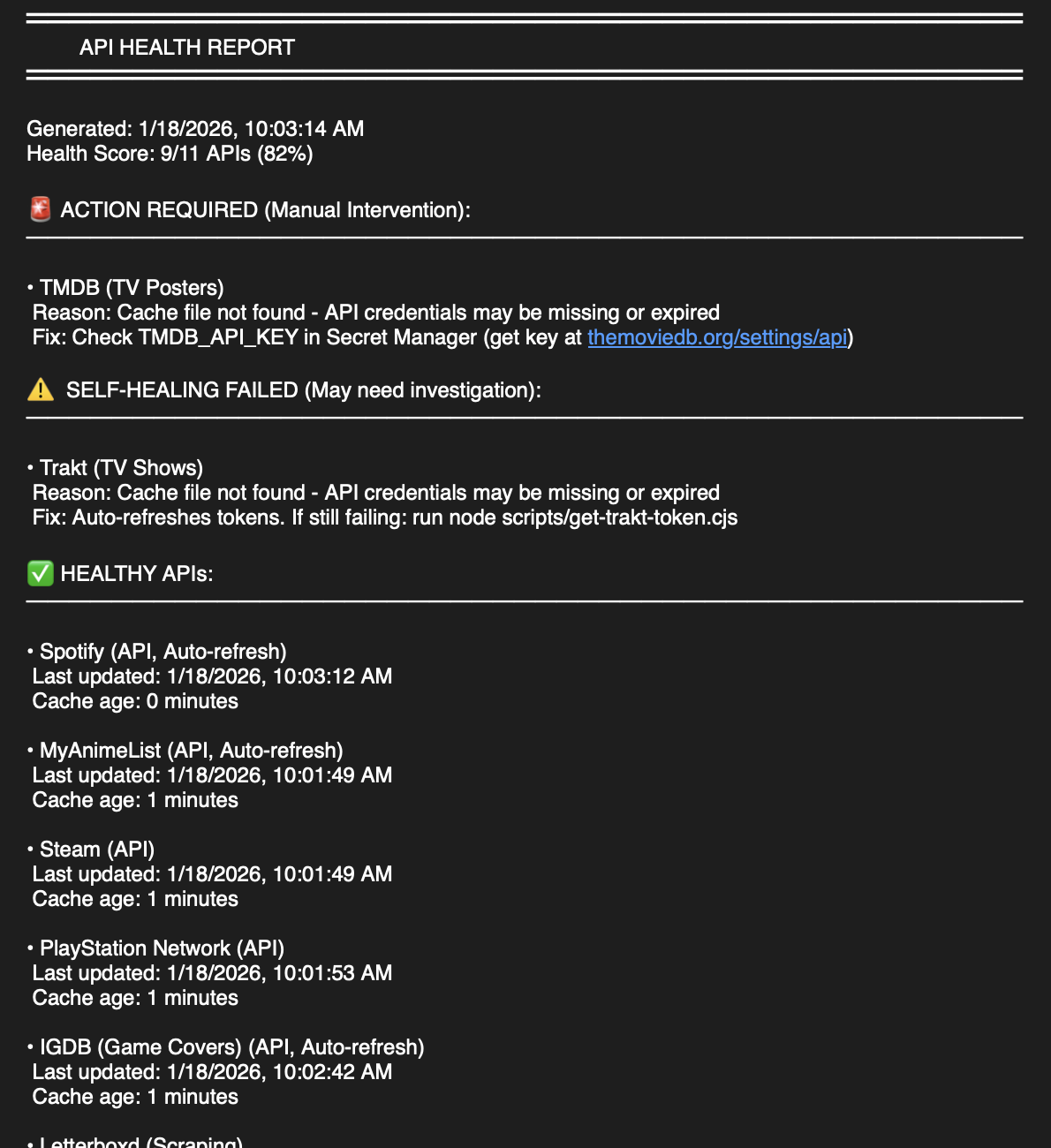
I typically find out about failures in the morning and can fix them quickly.
Deployment
The built site is deployed to Google Cloud Storage with Cloud CDN in front. Static assets use content-based hashing for immutable caching:
/assets/index.a1b2c3d4.js  → Cache-Control: public, max-age=31536000, immutable
/index.html                 → Cache-Control: public, max-age=0, must-revalidate
This gives the best of both worlds: instant cache invalidation for HTML while leveraging browser caching for assets.
Claude Code Development Experience
The entire codebase was written using Claude Code. This wasn’t just using AI for code completion - every feature, from initial architecture to bug fixes, was developed through conversation with Claude.
Some observations from this approach:
What worked well:
- Rapid prototyping - ideas could be tested in minutes
- Consistent code style across the entire codebase
- Complex integrations (OAuth flows, API handling) were implemented correctly on first try
- Refactoring was painless - just describe what you want changed
Challenges:
- Context management for large files required careful attention
- Some platform-specific quirks (like PlayStation’s unofficial API) needed extra iteration
- Testing edge cases required explicit prompting
- Game name matching against IGDB went through many iterations before getting reliable results
- Web scraping (Letterboxd) required handling lazy-loaded images and Cloud Build dependencies
- Initial token refresh approach refreshed during build, but tokens still drifted - had to move to pre-build scripts that persist back to Secret Manager
The experiment proved that building with Claude Code is viable for real-world projects, not just toy examples.
Lessons Learned
-
OAuth is hard - Managing tokens across multiple providers with different lifetimes is genuinely complex. The initial approach of refreshing tokens during the build didn’t work - refreshed tokens weren’t persisted, so they’d drift out of sync with Secret Manager. The solution was a pre-build script that refreshes and immediately writes back to Secret Manager.
-
Game matching is harder than expected - Searching IGDB by game name sounds simple, but Steam reports games with weird suffixes, edition names pollute search results, and the “main” version of a game isn’t always the top result. It took multiple iterations to get reliable matching.
-
Web scraping needs infrastructure - Letterboxd scraping required Puppeteer, which meant installing Chrome dependencies in Cloud Build and handling lazy-loaded images properly.
-
Cache everything - External API calls are slow and unreliable. Aggressive caching improved build times from 3+ minutes to under 30 seconds.
-
Graceful degradation matters - A missing Spotify integration shouldn’t break the entire site. Design for partial failures.
-
Claude Code works - Building this entire site without writing code manually wasn’t a gimmick - it was genuinely more productive. The key was acting as a product owner (reviewing, providing feedback) rather than a developer.
The codebase is open source on GitHub for anyone curious about the implementation details.
This post was written by Claude Code by analyzing the codebase, git history, and commit messages - staying true to the spirit of how the entire site was built.